MCP Server
The branchly MCP (Model Context Protocol) server exposes your branchly application to AI coding assistants and agents (e.g. OpenCode, Claude Code). Once connected, an AI agent can read and write your knowledge base, manage prompts and AI Actions, and inspect session data — all programmatically.
Setup
The MCP server is scoped to a single application via an API key. Create an API key in the application settings, then add the server to your AI coding tool.
OpenCode
Add to your opencode.jsonc:
{
  "mcp": {
    "branchly": {
      "type": "remote",
      "url": "https://api.branchly.io/mcp",
      "enabled": true,
      "headers": {
        "x-api-key": "YOUR_API_KEY"
      }
    }
  }
}
Claude Code
Run once in your terminal:
claude mcp add branchly-app --transport http https://api.branchly.io/mcp -H "x-api-key: YOUR_API_KEY"
Langdock
Langdock allows you to connect remote MCP servers to empower your team's AI assistants with direct access to your branchly applications.
Follow these steps to connect and configure the branchly MCP server in Langdock:
Step 1: Add a new integration
In your Langdock workspace, navigate to Customize → Integrations in the left sidebar, then click the Add integration button in the top-right corner.
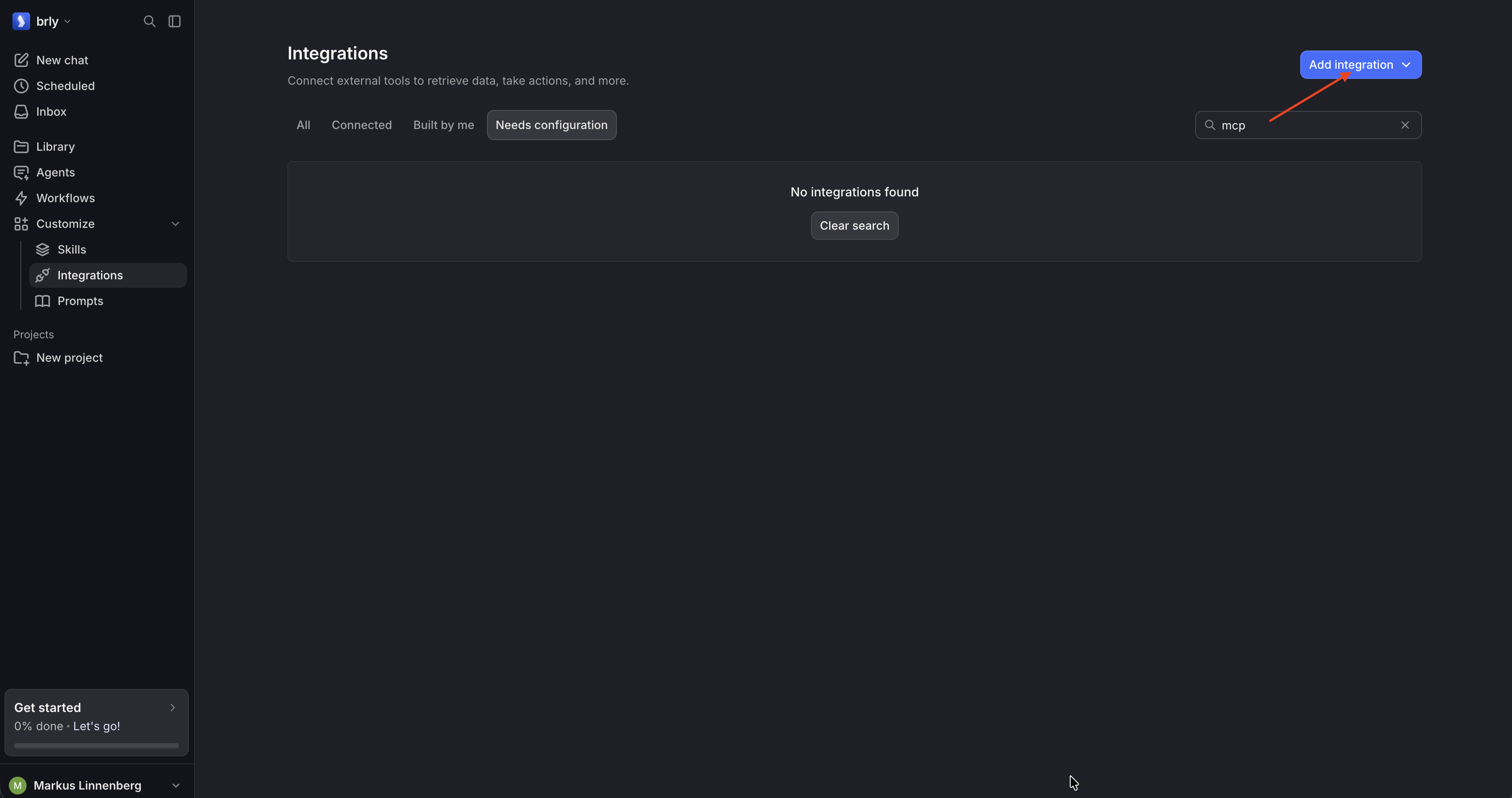 Navigate to Customize → Integrations and click "Add integration".
Step 2: Connect remote MCP
In the modal, select Connect remote MCP. Set the Server URL to https://api.branchly.io/mcp, select your authentication method (e.g. API Key), and click Create and connect.
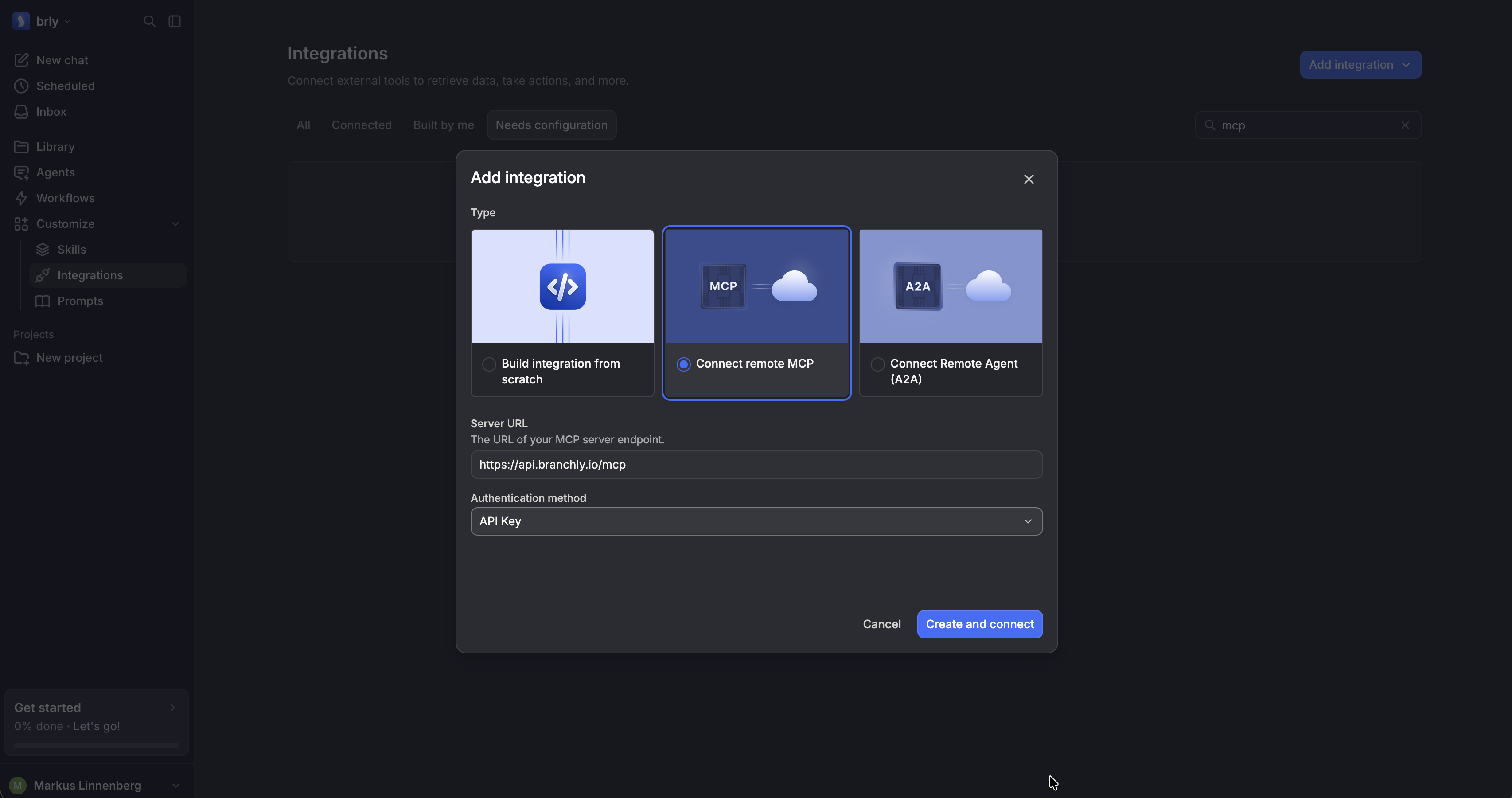 Select "Connect remote MCP", enter
 https://api.branchly.io/mcp, and click "Create and connect".
Step 3: Configure authentication and custom headers
Give the integration a name (e.g., branchly MCP).
In the Configure MCP client view:
- Ensure the Server URL is set to
https://api.branchly.io/mcp/(detected transport: Streamable HTTP). - Set Authentication method to
Noneif supplying your token via custom headers. - Under Custom Headers, add the header
x-api-keyand enter your branchly API key as the value.
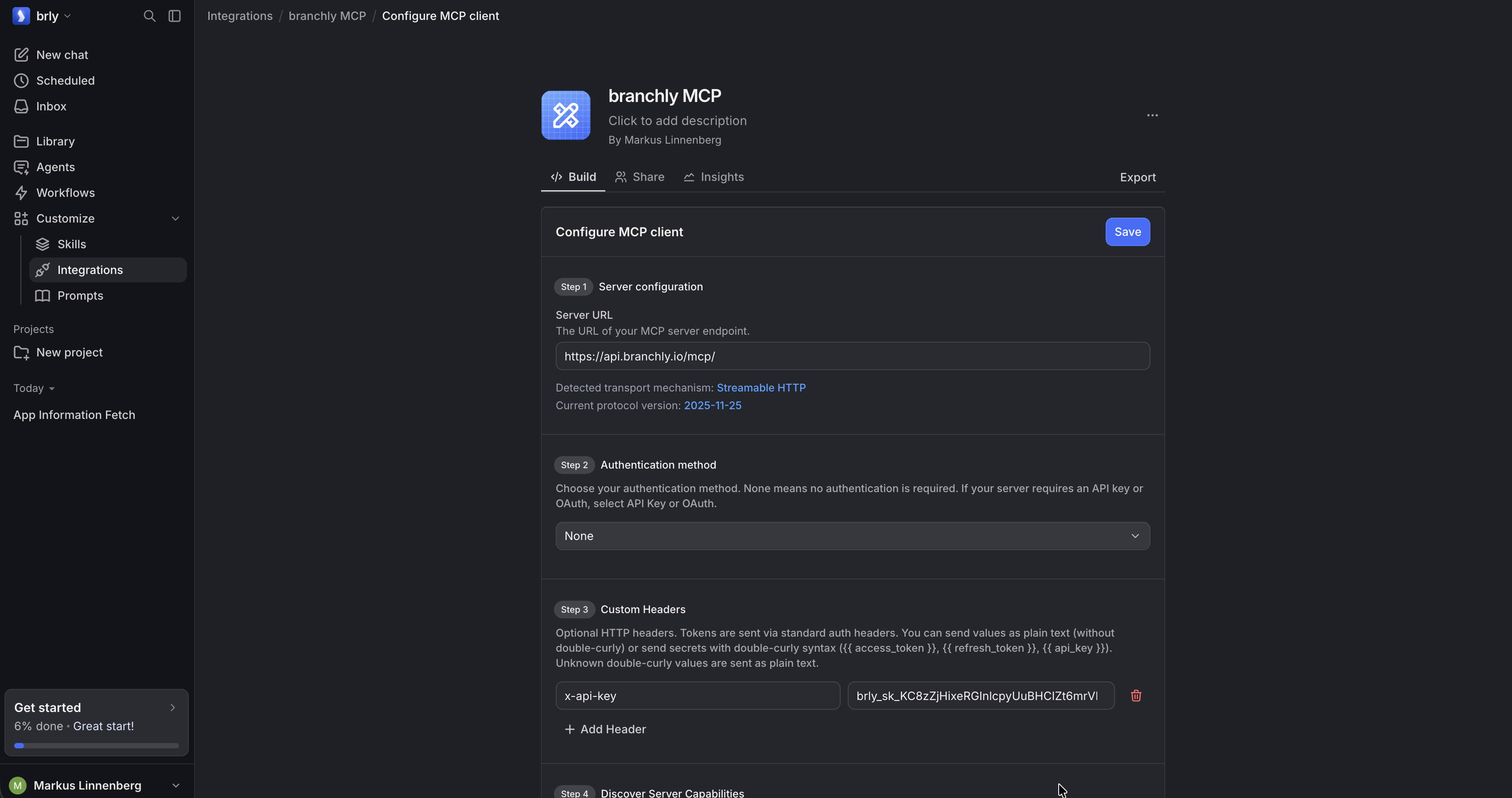 Add the
 x-api-key header with your branchly API key in the custom headers section.
Step 4: Discover server capabilities and save
Under Step 4 (Discover Server Capabilities), click List Server Features. Langdock will query the branchly MCP server and list all available tools and actions (e.g., get_application, list_nodes, create_node, update_node, etc.). Enable the actions you need and click Save in the top-right corner.
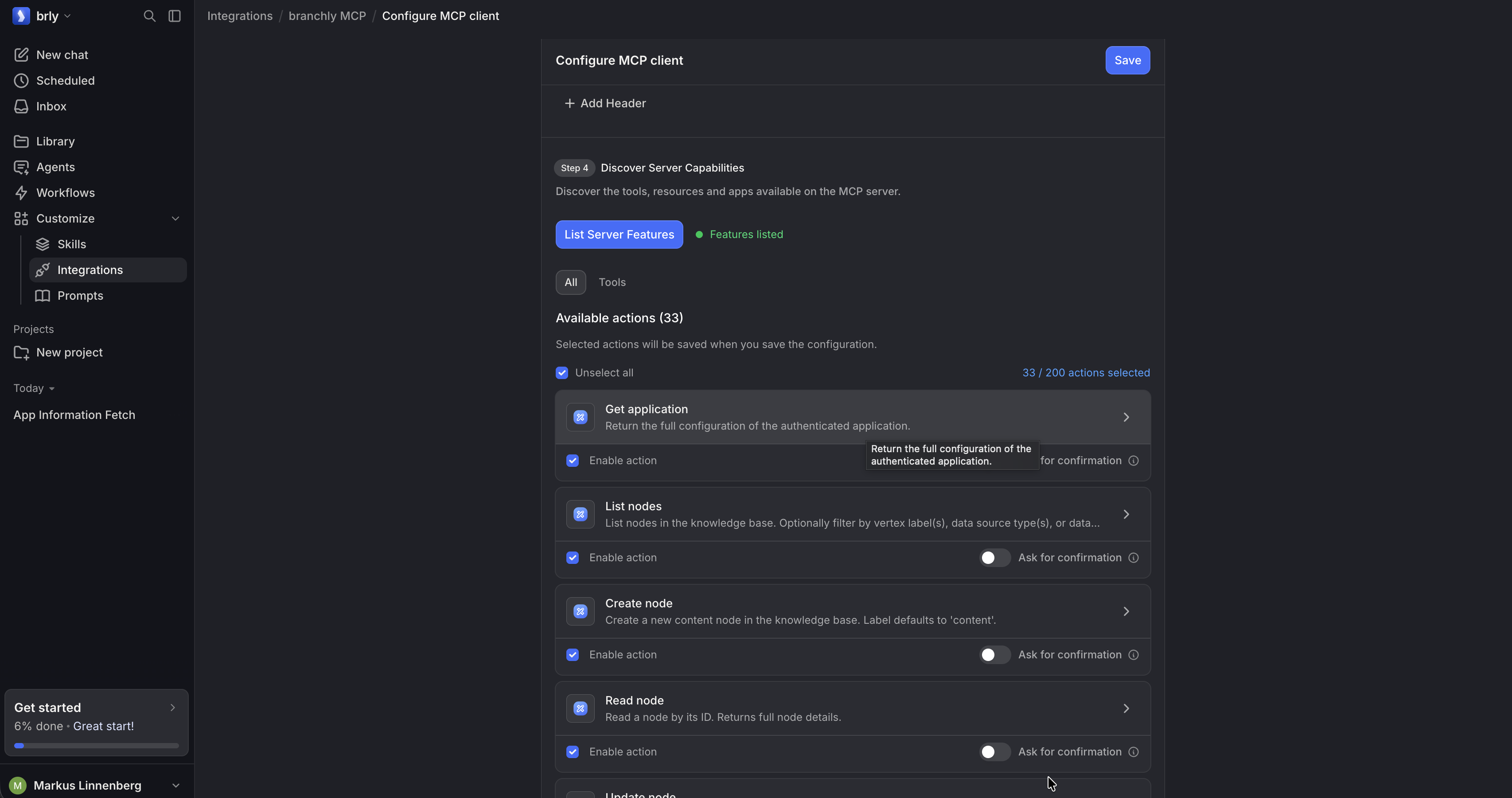 Click "List Server Features" to discover capabilities, enable actions, and click "Save".
Step 5: (Optional) Configure skills and workflows
Under Customize → Skills, you can create or upload skills (such as the official branchly skills) to provide your Langdock agents with structured workflows for auditing, optimizing, and maintaining your branchly application.
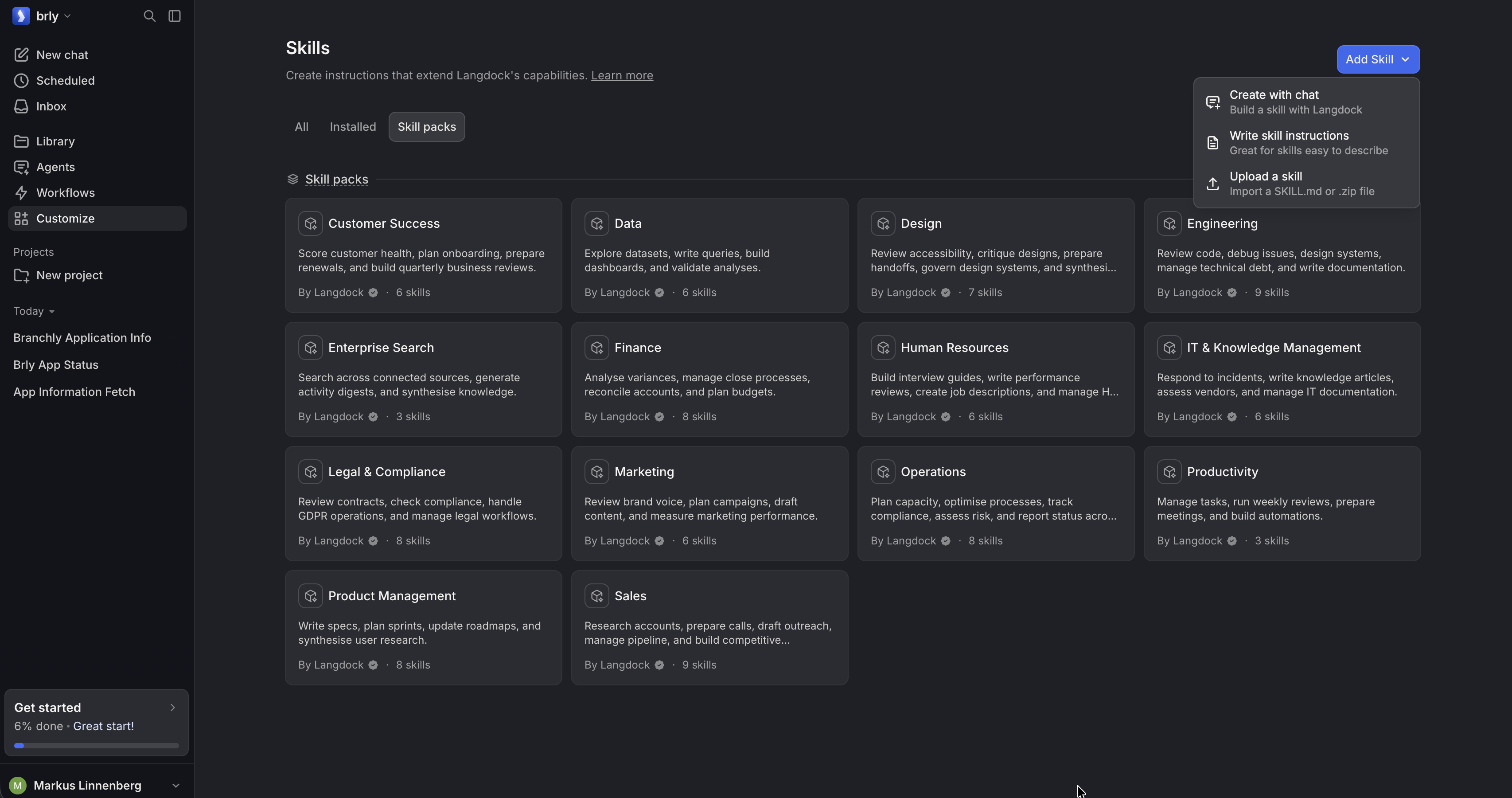 Optionally configure or upload skills in Langdock to provide structured workflows.
Step 6: Query and manage branchly in chat
Start a new chat session in Langdock and reference @branchly MCP (or select the branchly tools). You can now ask questions about your configuration or instruct the model to inspect and update your knowledge base.
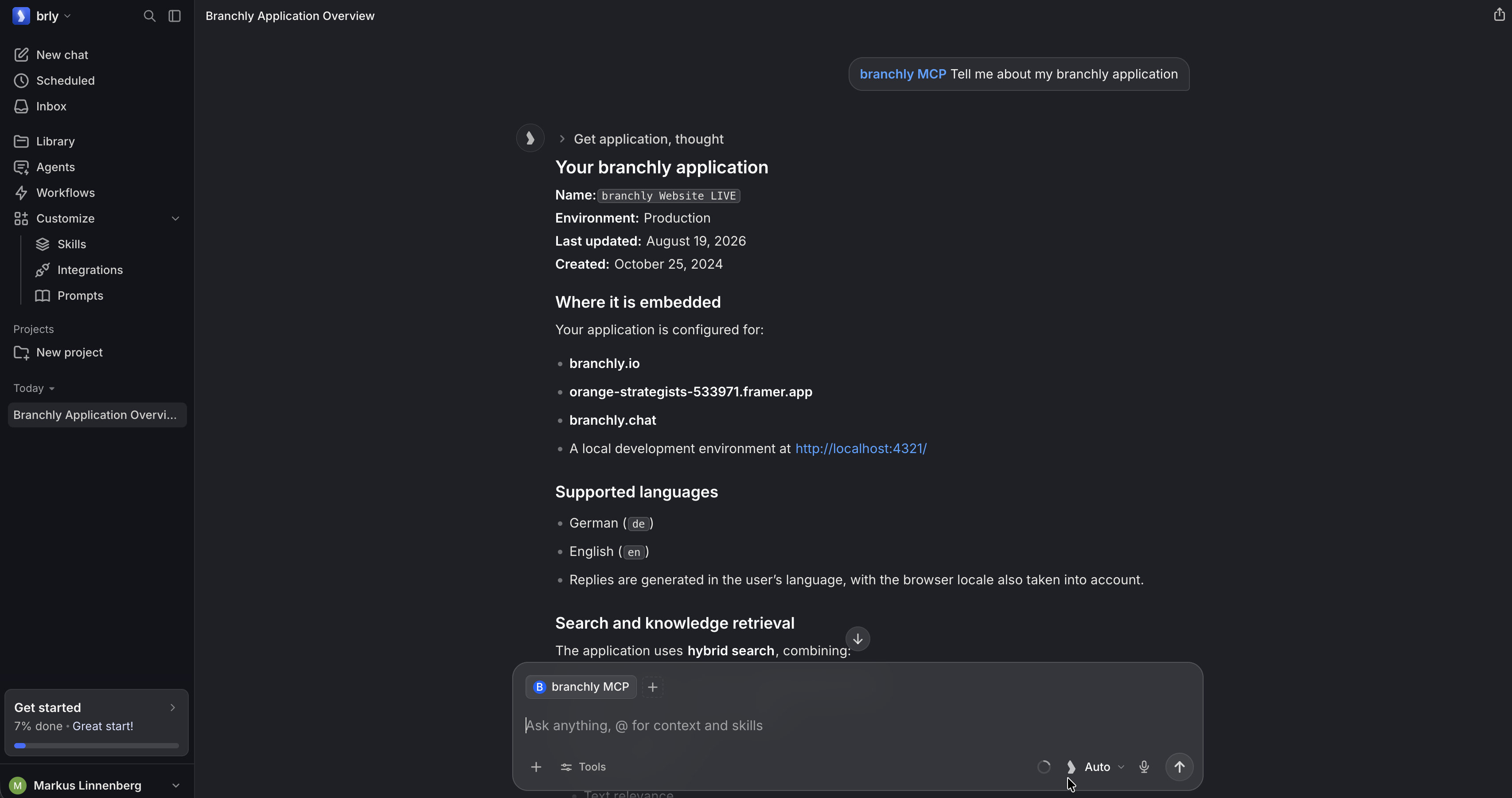 Chat with
 @branchly MCP in Langdock to inspect and manage your branchly application.
Methods
Application
get_application
Returns the full configuration of the connected application: name, embed locations, search settings (mode, models, reranking), chat strategy, locales, and deletion policy.
Use when: you need to inspect or document the current application state.
Knowledge Base — Nodes
Nodes are the atomic units of the knowledge base. Each node has a locale-keyed title and text (HTML), an optional source URL, and optional custom_metadata.
list_nodes
Returns a paginated list of nodes. Supports filtering by:
labels— node type (entry,content,contact,tool)data_source_types— e.g.website_crawler,file_upload,node_editor,webhookdata_source_ids— one or more specific data source UUIDssort_parameters— sort byupdated_atascending or descending
create_node
Creates a new content node. Requires title and text as locale-keyed maps (e.g. {"en": "...", "de": "..."}). Optionally accepts label, source, score_boost and custom_metadata. label defaults to content.
Use when: adding manual FAQ entries, fallback answers, or contact information that isn't covered by a crawled data source.
read_node
Returns the full detail of a single node by ID, including its text content, metadata, score_boost, and data source association.
update_node
Partially updates a node. Supported fields:
title/text— locale-keyed maps; provided locales are merged, others preservedscore_boost— numeric multiplier applied during retrieval ranking (e.g.1.5to surface this node more often)source— canonical URLcustom_metadata— arbitrary key-value metadata; keys are merged
Use when: fixing stale content, enriching node text with user-phrasing variants, or boosting signal for high-value nodes.
Data Sources
Data sources define how content is ingested into the knowledge base (crawling, file upload, API, webhook, etc.).
list_data_sources
Returns all data sources for the application. Supports filtering by data_source_types. Results are ordered by last update.
Supported types:
| Type | Description |
|---|---|
website_crawler | Crawls public websites via Apify |
custom_website_crawler | Crawl with custom HTML markers and graph builder |
file_upload | Uploaded PDFs or documents |
openAPI | API endpoint synced via OpenAPI spec |
helpspace | Connected helpspace/help center |
webhook | Data pushed via webhook with custom mapping |
wordpress | Connected WordPress site importing Pages and Posts |
node_editor | Manually created/edited nodes |
update_data_source
Updates a data source. Supports partial updates for name, schedule (cron expression or null to disable), and settings.
settings requires the full object — the API does not merge partial settings. Always read the current data source first, then write back the complete settings with your change applied.
Use when: adjusting crawler selectors (remove_html_elements), changing crawl depth/page limits, or enabling scheduled re-syncs.
Prompts
branchly has three distinct prompt types, each controlling a different interface:
| Type | Subtype | Scope |
|---|---|---|
chat — routing_instructions | Prompt Persona | Decides which AI Actions to call in Chat; drives auto-evaluation. No effect on response tone. |
chat — output_instructions | Output Instructions | Generates the final user-facing Chat response. No effect on routing. |
search_answering | (none) | Controls the answer generated in the Search interface. No routing/output split. |
list_prompts
Returns prompts filtered by prompt_type (chat, search_answering, suggested_questions, chat_evaluation), subtype, and is_active. Returns all when filters are omitted.
create_prompt
Creates a new prompt version and automatically deactivates the previously active prompt of the same type + subtype. There is no separate activation step.
Use when: updating the routing logic, changing response tone/format, or updating the Search answering prompt.
update_prompt
Activates or deactivates an existing prompt by ID. Use is_active=true to restore a previous prompt version (the currently active one is deactivated automatically).
Use when: rolling back to a previous prompt version.
AI Actions (Tools)
AI Actions are callable functions the chat agent can invoke during a conversation (e.g. search the knowledge base, send a contact form, query an external API).
Naming note: The branchly dashboard labels these "AI Actions". The MCP API exposes them via the *_tools methods. Both refer to the same entities.
list_tools
Returns all AI Actions. Pass active=true to return only enabled actions.
read_tool
Returns the full configuration of a single AI Action by ID, including its description, function_arguments, and tool_config.
update_tool
Partially updates an AI Action. Supported fields:
name— snake_case function name (max 64 chars)description— natural-language description used by the routing agent to decide when to call this action; must be precise and MECE across all actionsactive— enable or disable the actionfunction_arguments— runtime config (e.g.document_limit_default,retrieval_method,data_source_ids_filterfor KB tools; recipient email for send-email tools)tool_config— parameter schema exposed to the LLM (for form and API tools)
Use when: fixing misfiring actions, tuning knowledge base retrieval settings, or disabling unused actions.
Sessions
read_sessions
Returns paginated session summaries ordered by start time descending. Supports filtering by:
interactions—chat,search,navigation,form_submission,voiceembed_types—chat,search,chat_widget,search_interface,voice,apianswer_types—complete,no_knowledge,outside_scope,small_talk,follow_up_questiontool_ids— sessions that involved a specific AI Actionsearch_query— full-text search across session contenttime_filter— time window: a preset (last_30_days,last_month,this_month,this_year,last_6_months,last_12_months) or an explicit ISO date range (YYYY-MM-DD,YYYY-MM-DD)
Use when: triaging chatbot failures, identifying no_knowledge or outside_scope patterns, or auditing tool usage.
read_session_detail
Returns the complete interaction history for a single session, including all chat turns, tool calls, documents retrieved, and answer classifications.
Use when: diagnosing a specific failure — checking whether a tool fired, what documents were returned, and how the model reasoned.
To drill into the exact documents, tool calls, or search results behind an individual interaction, see below.
read_chat_request_documents
Read the full document chunks retrieved for a single chat request (QA or SA), by chat_request_id. Returns chunk_id, vertex_id, title, full text, score, source, data source type, page metadata, and whether the chunk was cited in the final answer. Ordered by score descending.
Use when: after read_session_detail, inspecting the exact context the assistant grounded its answer in.
read_chat_request_tool_calls
Read the full tool calls executed for a single chat request, by chat_request_id. Returns tool_call_id, tool_id, tool_name, tool_type, full arguments (JSON), and full content/response (JSON), ordered by timestamp ascending.
Use when: inspecting what the assistant invoked and how the tool responded.
read_search_request_results
Read the full search results returned for a single instant-search request, by search_request_id. Returns chunk_id, vertex_id, title, full text, and relevance score, ordered by score descending.
Use when: inspecting the exact results a user saw for their search query.
Analytics
The analytics methods surface insight and quality signals across your application's session data. Most accept a time_filter — either a preset enum value (this_month, this_year, last_month, last_30_days (default), last_6_months, last_12_months) or an explicit ISO date range YYYY-MM-DD,YYYY-MM-DD (inclusive) — and many accept an optional limit (default 15) controlling how many top rows are returned.
get_active_sessions_over_time
Time series of active sessions, bucketed by day or week (auto-chosen from the time window). Each row breaks the total down by interaction type (chat / search / navigation / form_submission / voice). Gaps are zero-filled, so the series is safe to plot directly. Optionally filter by embed_types.
Use when: spotting spikes, dips, or trends in active sessions over time.
get_active_sessions_by_embed
Time series of active sessions broken down by embed type (chat, chat_widget, navigator, search_interface, voice, api).
Use when: understanding which interfaces (embed types) are driving usage.
get_top_locales
Top locales (BCP-47 style, e.g. de_DE, en_US) across chat, search, and navigation requests, ranked by occurrence count.
Use when: understanding which languages/regions are being served and where content gaps may exist.
get_top_languages
Top detected natural languages of user chat questions, ranked by occurrence count. Differs from get_top_locales: locale reflects the embed/browser setting, while language is detected from the actual query text.
get_top_devices
Top device categories (e.g. desktop, mobile, tablet) across all request types, ranked by occurrence count.
get_top_geographies
Top (country, region) combinations across all request types, ranked by occurrence count. Country is an ISO country code; region may be null when unavailable.
get_sentiment_distribution
Sentiment distribution of chat answers as counts of positive, negative, and neutral.
Use when: as a quick quality signal — a rising negative share usually warrants drilling into individual sessions via read_sessions.
get_top_cited_sources
Knowledge-base nodes most frequently cited in chat answers, ranked by citation count. Each row carries the node UUID (vertex_id), its title, optional source URL, and citation_count. Optionally filter by embed_types.
Use when: discovering which knowledge is actually load-bearing; pair with read_node(vertex_id) to inspect cited content.
get_top_clicked_urls
URLs users actually clicked from inside the embed (search results, citation links, follow-ups), ranked by click count. Optionally filter by event_types (search_result, link, contact, tool, follow_up_navigation, follow_up_question).
Use when: seeing what users find useful enough to click through to.
get_top_interaction_sources
Page URLs the user was on when they interacted with the embed (chat, search, navigation, form submission), ranked by occurrence count. Differs from get_top_clicked_urls: this is the origin page, not the destination.
Use when: finding which pages of the host site drive the most embed engagement.
get_top_searches
Top user search queries (normalized: lowercased, trimmed), ranked by occurrence count.
get_top_tags
Top tags attached to chat answers (auto-derived classifications, distinct from classifications), ranked by occurrence count. Optionally restrict to specific answer_types.
get_answer_type_distribution
Distribution of chat answer types, ranked by occurrence count.
get_trending_classifications
Time series of trending classifications (topics OR intents inferred from chat content), one series per classification id. Each series item carries a period timestamp and count. Requires classification_type (topic for subject-matter trends, intent for user-goal trends).
Use when: seeing how topical or intent demand shifts over time.
update_chat_request_analytics
The one write method in the analytics group. Partially updates analytics fields on a chat request, identified by chat_request_id. Only the fields you pass are changed. Supported fields:
summary— free-text summary of the interactiontags— list of classification tagsanswer_type— reclassify the answer (e.g. correct ano_knowledgethat actually got answered)sentiment—positive,neutral, ornegativeclassification_topic_id/classification_intent_id— reattach a topic or intent classification
Use when: correcting misclassified sessions, refining summaries, or retagging interactions after the fact (e.g. to clean up analytics before reporting).
Common Workflows
| Goal | Methods |
|---|---|
Debug a no_knowledge response | read_sessions → read_session_detail |
| Fix noisy crawled content | list_data_sources → update_data_source (with full settings) |
| Boost a high-value node | read_node → update_node (score_boost) |
| Add a missing FAQ | create_node |
| Fix an AI Action that never fires | list_tools → read_tool → update_tool (description) + create_prompt (routing) |
| Update the Search answering prompt | list_prompts(prompt_type="search_answering") → create_prompt |
| Roll back a prompt | list_prompts → update_prompt (is_active=true) |
| Update crawler HTML filters | list_data_sources → copy full settings → update_data_source |
Skills
Also install the official branchly skills https://github.com/branchly-io/branchly-skills for even more detailed instructions on how to use the MCP server.